
What is Threads in Instagram is a question many users ask as social media platforms continue to evolve. Threads is a text-based social app launched by Instagram to support real-time conversations, opinions, and community discussions. While Instagram is known for visuals like photos and videos, Threads focuses on written content and engagement through text.
Threads was created to offer users a simpler way to share thoughts, join discussions, and connect with audiences without relying on images or reels. It blends Instagram’s social graph with a new conversation-driven experience.
Understanding what is Threads in Instagram helps creators, professionals, and businesses decide whether this platform fits their content strategy in 2026 and beyond.
Why Did Instagram Launch Threads
Instagram launched Threads to address the growing demand for text-based social interaction. Many users wanted a space to share opinions, updates, and short insights without the pressure of visual content creation.
Another reason behind the launch was the shift in social media behavior toward community conversations rather than passive scrolling, highlighting why emotional intelligence matters at work in digital interactions as well. Threads allows users to engage through replies, reposts, and discussions that feel more immediate and personal.
By launching Threads, Instagram expanded its ecosystem and provided users with a platform focused on conversation instead of visuals.
How Threads Works with Instagram
Understanding what is Threads in Instagram requires knowing how closely it connects with Instagram itself. Threads works as an extension of Instagram rather than a standalone social network.
Key ways Threads works with Instagram include:
Login through your existing Instagram account
Automatic username and profile setup
Access to your Instagram followers
Shared verification and identity
This integration allows users to quickly build an audience on Threads without starting from scratch, especially for creators looking to become a successful Instagram influencer by extending their reach beyond a single platform. The platform benefits from Instagram’s established user base while offering a new content format.
While Threads focuses on text-based conversations, short-form video still plays a major role in Instagram growth. Creators who align their Threads content with Reels strategy often see better overall reach and engagement. If you want to strengthen your visibility further, these Instagram Reels Growth Tips explain how consistent posting, timing, and audience signals can help improve performance across the platform.
How Threads Works with Instagram Profiles
Threads pulls profile information directly from Instagram. Your bio, profile picture, and verification status are carried over automatically.
This makes Threads easy to set up and ensures consistency across platforms, even for creators who regularly download Instagram reels legally to repurpose content responsibly. Users can choose which Instagram followers to connect with on Threads, creating a tailored audience experience.
For creators and businesses, this connection simplifies branding and audience management across both platforms.
How to Create a Threads Account
Creating a Threads account is straightforward and user-friendly.
Steps to create a Threads account:
Download the Threads app from the app store
Sign in using your Instagram account
Customize your profile details if needed
Choose followers to connect with
Start posting text content
You cannot create a Threads account without an Instagram profile. This requirement ensures authenticity and reduces spam accounts.
How to Use Threads for the First Time
When users first explore what is Threads in Instagram, they notice its clean and minimal interface. Threads focuses on text posts with optional links, images, or short videos.
Common actions on Threads include:
Posting short text updates
Replying to conversations
Reposting content
Following new users
Engaging with trending topics
Threads encourages authentic conversations instead of curated visuals, making it easier for users to participate without overthinking content.
Threads vs Twitter (X): A Comparison
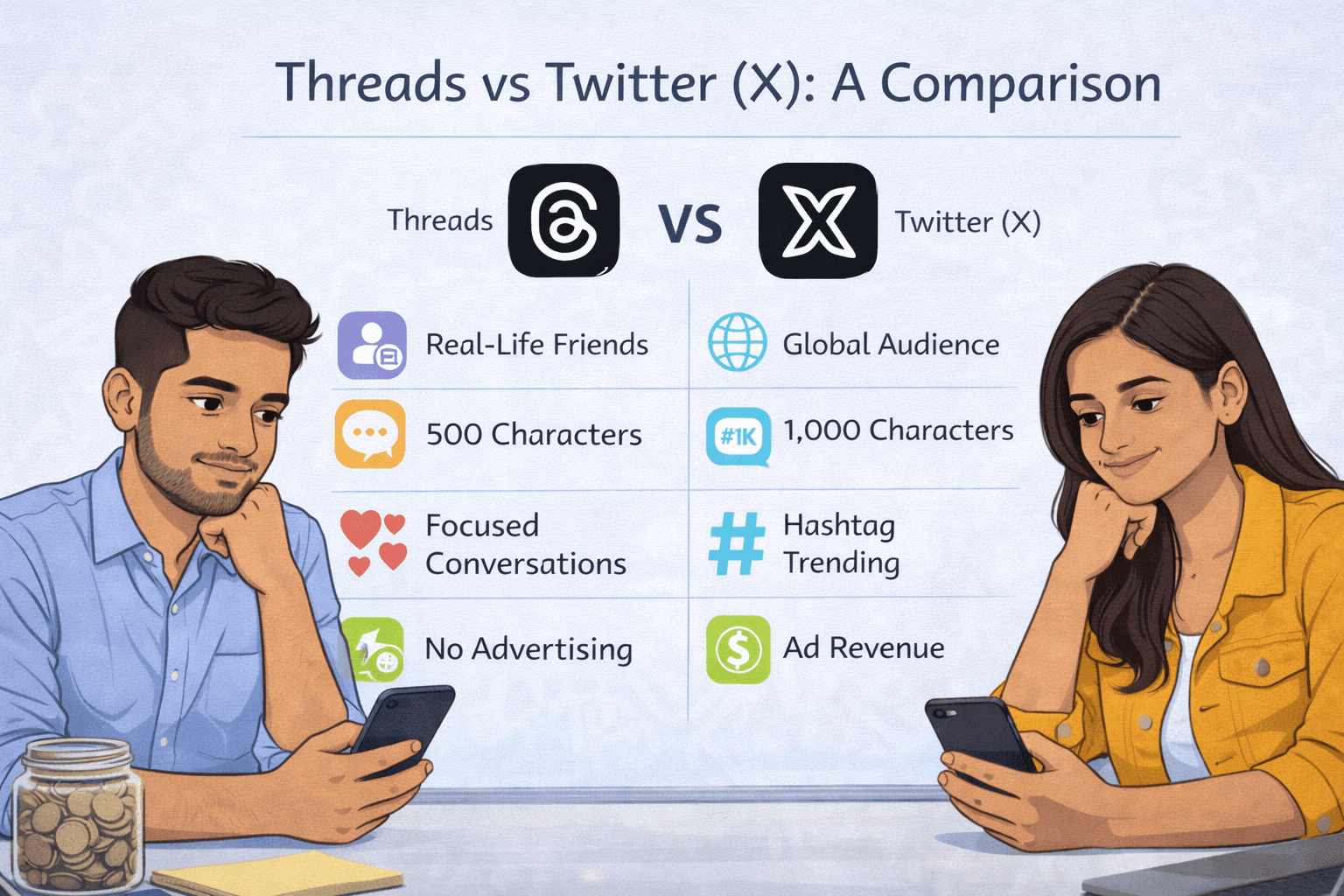
Many users compare Threads with Twitter, now known as X. While both platforms focus on text-based content, their approaches differ.
Threads emphasizes community engagement, simplicity, and integration with Instagram. Twitter focuses more on trending news, public debates, and real-time updates.
Key differences include:
Threads connects directly with Instagram followers
Twitter operates as a standalone platform
Threads has a cleaner interface
Twitter supports broader content formats and longer history
For creators already active on Instagram, Threads feels like a natural extension rather than a replacement.
Threads Features That Matter to Users
Understanding what is Threads in Instagram also means knowing its key features.
Important Threads features include:
Text-first posting
Engagement through replies and reposts
Privacy controls
Algorithm-driven feed
Community-focused interactions
Threads continues to evolve with updates aimed at improving engagement, visibility, and user experience.
Threads Privacy Settings and Safety
Privacy and safety play an important role in how users interact on Threads. The platform includes controls to manage who can reply, mention, or follow you.
Users can:
Control reply permissions
Block or mute accounts
Report inappropriate content
Manage visibility settings
These features help create a safer environment for open discussion and content sharing.
How Creators and Businesses Can Use Threads
Threads is not limited to casual users. Creators and businesses can use it for branding, audience engagement, and thought leadership.
Ways businesses use Threads include:
Sharing insights and opinions
Engaging with audience questions
Building community trust
Supporting content marketing efforts
Creators exploring monetization can combine Threads with Instagram strategies such as Earn from Instagram and Make Money with Reels to expand reach and influence.
Many creators also explore Threads as a way to support their overall Instagram income strategy. When combined with a strong posting plan, it can help boost visibility and audience trust, which directly impacts monetization opportunities. To understand the income potential better, you can explore Influencer Earnings in India and see how consistent engagement across platforms contributes to long-term growth.
Is Threads Worth Using in 2026
Whether Threads is worth using depends on your goals. For users who enjoy text-based interaction, Threads offers a refreshing alternative to visual-heavy platforms.
Threads is especially useful for:
Content creators
Influencers
Business owners
Digital marketers
Community builders
With regular updates and growing adoption, Threads continues to establish itself as a valuable platform for conversation-driven engagement.
Conclusion
Understanding what is Threads in Instagram helps users decide how to adapt their social media presence in a changing digital landscape. Threads offers a clean, conversation-focused platform that complements Instagram rather than competing with it. For creators, professionals, and businesses, Threads provides new opportunities to connect authentically and build engaged communities.
If you want to learn how to grow effectively across Instagram and Threads, explore the Instagram Mastery Course or Contact Our Team to get expert guidance.
FAQ
1. What are Threads on Instagram?
Threads is a text-based social media app launched by Instagram for conversation-focused content.
2. How does Threads work with Instagram?
Threads uses your Instagram account for login, profile setup, and audience connection.
3. Is Threads different from Instagram?
Yes, Threads focuses on text conversations while Instagram centers on visual content.
4. Do I need an Instagram account to use Threads?
Yes, an Instagram account is required to create a Threads profile.
5. Is Threads free to use?
Yes, Threads is completely free.
6. How safe is the Threads app?
Threads includes privacy controls, moderation tools, and account management features.
7. Can businesses use Threads for marketing?
Yes, businesses can use Threads for engagement, branding, and audience interaction.
8. How is Threads different from Twitter (X)?
Threads integrates with Instagram and focuses on community conversations, while Twitter operates independently.
9. Can I delete Threads without deleting Instagram?
Yes, you can deactivate Threads without removing your Instagram account.
10. Is Threads worth using in 2026?
Yes, especially for creators and brands focused on conversation-based engagement.




What is Threads in Instagram is a question many users ask as social media platforms continue to evolve. Threads is a text-based social app launched by Instagram to support real-time conversations, opinions, and community discussions. While Instagram is known for visuals like photos and videos, Threads focuses on written content and engagement through text.
Threads was created to offer users a simpler way to share thoughts, join discussions, and connect with audiences without relying on images or reels. It blends Instagram’s social graph with a new conversation-driven experience.
Understanding what is Threads in Instagram helps creators, professionals, and businesses decide whether this platform fits their content strategy in 2026 and beyond.
Why Did Instagram Launch Threads
Instagram launched Threads to address the growing demand for text-based social interaction. Many users wanted a space to share opinions, updates, and short insights without the pressure of visual content creation.
Another reason behind the launch was the shift in social media behavior toward community conversations rather than passive scrolling, highlighting why emotional intelligence matters at work in digital interactions as well. Threads allows users to engage through replies, reposts, and discussions that feel more immediate and personal.
By launching Threads, Instagram expanded its ecosystem and provided users with a platform focused on conversation instead of visuals.
How Threads Works with Instagram
Understanding what is Threads in Instagram requires knowing how closely it connects with Instagram itself. Threads works as an extension of Instagram rather than a standalone social network.
Key ways Threads works with Instagram include:
Login through your existing Instagram account
Automatic username and profile setup
Access to your Instagram followers
Shared verification and identity
This integration allows users to quickly build an audience on Threads without starting from scratch, especially for creators looking to become a successful Instagram influencer by extending their reach beyond a single platform. The platform benefits from Instagram’s established user base while offering a new content format.
While Threads focuses on text-based conversations, short-form video still plays a major role in Instagram growth. Creators who align their Threads content with Reels strategy often see better overall reach and engagement. If you want to strengthen your visibility further, these Instagram Reels Growth Tips explain how consistent posting, timing, and audience signals can help improve performance across the platform.
How Threads Works with Instagram Profiles
Threads pulls profile information directly from Instagram. Your bio, profile picture, and verification status are carried over automatically.
This makes Threads easy to set up and ensures consistency across platforms, even for creators who regularly download Instagram reels legally to repurpose content responsibly. Users can choose which Instagram followers to connect with on Threads, creating a tailored audience experience.
For creators and businesses, this connection simplifies branding and audience management across both platforms.
How to Create a Threads Account
Creating a Threads account is straightforward and user-friendly.
Steps to create a Threads account:
Download the Threads app from the app store
Sign in using your Instagram account
Customize your profile details if needed
Choose followers to connect with
Start posting text content
You cannot create a Threads account without an Instagram profile. This requirement ensures authenticity and reduces spam accounts.
How to Use Threads for the First Time
When users first explore what is Threads in Instagram, they notice its clean and minimal interface. Threads focuses on text posts with optional links, images, or short videos.
Common actions on Threads include:
Posting short text updates
Replying to conversations
Reposting content
Following new users
Engaging with trending topics
Threads encourages authentic conversations instead of curated visuals, making it easier for users to participate without overthinking content.
Threads vs Twitter (X): A Comparison
Many users compare Threads with Twitter, now known as X. While both platforms focus on text-based content, their approaches differ.
Threads emphasizes community engagement, simplicity, and integration with Instagram. Twitter focuses more on trending news, public debates, and real-time updates.
Key differences include:
Threads connects directly with Instagram followers
Twitter operates as a standalone platform
Threads has a cleaner interface
Twitter supports broader content formats and longer history
For creators already active on Instagram, Threads feels like a natural extension rather than a replacement.
Threads Features That Matter to Users
Understanding what is Threads in Instagram also means knowing its key features.
Important Threads features include:
Text-first posting
Engagement through replies and reposts
Privacy controls
Algorithm-driven feed
Community-focused interactions
Threads continues to evolve with updates aimed at improving engagement, visibility, and user experience.
Threads Privacy Settings and Safety
Privacy and safety play an important role in how users interact on Threads. The platform includes controls to manage who can reply, mention, or follow you.
Users can:
Control reply permissions
Block or mute accounts
Report inappropriate content
Manage visibility settings
These features help create a safer environment for open discussion and content sharing.
How Creators and Businesses Can Use Threads
Threads is not limited to casual users. Creators and businesses can use it for branding, audience engagement, and thought leadership.
Ways businesses use Threads include:
Sharing insights and opinions
Engaging with audience questions
Building community trust
Supporting content marketing efforts
Creators exploring monetization can combine Threads with Instagram strategies such as Earn from Instagram and Make Money with Reels to expand reach and influence.
Many creators also explore Threads as a way to support their overall Instagram income strategy. When combined with a strong posting plan, it can help boost visibility and audience trust, which directly impacts monetization opportunities. To understand the income potential better, you can explore Influencer Earnings in India and see how consistent engagement across platforms contributes to long-term growth.
Is Threads Worth Using in 2026
Whether Threads is worth using depends on your goals. For users who enjoy text-based interaction, Threads offers a refreshing alternative to visual-heavy platforms.
Threads is especially useful for:
Content creators
Influencers
Business owners
Digital marketers
Community builders
With regular updates and growing adoption, Threads continues to establish itself as a valuable platform for conversation-driven engagement.
Conclusion
Understanding what is Threads in Instagram helps users decide how to adapt their social media presence in a changing digital landscape. Threads offers a clean, conversation-focused platform that complements Instagram rather than competing with it. For creators, professionals, and businesses, Threads provides new opportunities to connect authentically and build engaged communities.
If you want to learn how to grow effectively across Instagram and Threads, explore the Instagram Mastery Course or Contact Our Team to get expert guidance.
FAQ
1. What are Threads on Instagram?
Threads is a text-based social media app launched by Instagram for conversation-focused content.
2. How does Threads work with Instagram?
Threads uses your Instagram account for login, profile setup, and audience connection.
3. Is Threads different from Instagram?
Yes, Threads focuses on text conversations while Instagram centers on visual content.
4. Do I need an Instagram account to use Threads?
Yes, an Instagram account is required to create a Threads profile.
5. Is Threads free to use?
Yes, Threads is completely free.
6. How safe is the Threads app?
Threads includes privacy controls, moderation tools, and account management features.
7. Can businesses use Threads for marketing?
Yes, businesses can use Threads for engagement, branding, and audience interaction.
8. How is Threads different from Twitter (X)?
Threads integrates with Instagram and focuses on community conversations, while Twitter operates independently.
9. Can I delete Threads without deleting Instagram?
Yes, you can deactivate Threads without removing your Instagram account.
10. Is Threads worth using in 2026?
Yes, especially for creators and brands focused on conversation-based engagement.
What is Threads in Instagram is a question many users ask as social media platforms continue to evolve. Threads is a text-based social app launched by Instagram to support real-time conversations, opinions, and community discussions. While Instagram is known for visuals like photos and videos, Threads focuses on written content and engagement through text.
Threads was created to offer users a simpler way to share thoughts, join discussions, and connect with audiences without relying on images or reels. It blends Instagram’s social graph with a new conversation-driven experience.
Understanding what is Threads in Instagram helps creators, professionals, and businesses decide whether this platform fits their content strategy in 2026 and beyond.
Why Did Instagram Launch Threads
Instagram launched Threads to address the growing demand for text-based social interaction. Many users wanted a space to share opinions, updates, and short insights without the pressure of visual content creation.
Another reason behind the launch was the shift in social media behavior toward community conversations rather than passive scrolling, highlighting why emotional intelligence matters at work in digital interactions as well. Threads allows users to engage through replies, reposts, and discussions that feel more immediate and personal.
By launching Threads, Instagram expanded its ecosystem and provided users with a platform focused on conversation instead of visuals.
How Threads Works with Instagram
Understanding what is Threads in Instagram requires knowing how closely it connects with Instagram itself. Threads works as an extension of Instagram rather than a standalone social network.
Key ways Threads works with Instagram include:
Login through your existing Instagram account
Automatic username and profile setup
Access to your Instagram followers
Shared verification and identity
This integration allows users to quickly build an audience on Threads without starting from scratch, especially for creators looking to become a successful Instagram influencer by extending their reach beyond a single platform. The platform benefits from Instagram’s established user base while offering a new content format.
While Threads focuses on text-based conversations, short-form video still plays a major role in Instagram growth. Creators who align their Threads content with Reels strategy often see better overall reach and engagement. If you want to strengthen your visibility further, these Instagram Reels Growth Tips explain how consistent posting, timing, and audience signals can help improve performance across the platform.
How Threads Works with Instagram Profiles
Threads pulls profile information directly from Instagram. Your bio, profile picture, and verification status are carried over automatically.
This makes Threads easy to set up and ensures consistency across platforms, even for creators who regularly download Instagram reels legally to repurpose content responsibly. Users can choose which Instagram followers to connect with on Threads, creating a tailored audience experience.
For creators and businesses, this connection simplifies branding and audience management across both platforms.
How to Create a Threads Account
Creating a Threads account is straightforward and user-friendly.
Steps to create a Threads account:
Download the Threads app from the app store
Sign in using your Instagram account
Customize your profile details if needed
Choose followers to connect with
Start posting text content
You cannot create a Threads account without an Instagram profile. This requirement ensures authenticity and reduces spam accounts.
How to Use Threads for the First Time
When users first explore what is Threads in Instagram, they notice its clean and minimal interface. Threads focuses on text posts with optional links, images, or short videos.
Common actions on Threads include:
Posting short text updates
Replying to conversations
Reposting content
Following new users
Engaging with trending topics
Threads encourages authentic conversations instead of curated visuals, making it easier for users to participate without overthinking content.
Threads vs Twitter (X): A Comparison
Many users compare Threads with Twitter, now known as X. While both platforms focus on text-based content, their approaches differ.
Threads emphasizes community engagement, simplicity, and integration with Instagram. Twitter focuses more on trending news, public debates, and real-time updates.
Key differences include:
Threads connects directly with Instagram followers
Twitter operates as a standalone platform
Threads has a cleaner interface
Twitter supports broader content formats and longer history
For creators already active on Instagram, Threads feels like a natural extension rather than a replacement.
Threads Features That Matter to Users
Understanding what is Threads in Instagram also means knowing its key features.
Important Threads features include:
Text-first posting
Engagement through replies and reposts
Privacy controls
Algorithm-driven feed
Community-focused interactions
Threads continues to evolve with updates aimed at improving engagement, visibility, and user experience.
Threads Privacy Settings and Safety
Privacy and safety play an important role in how users interact on Threads. The platform includes controls to manage who can reply, mention, or follow you.
Users can:
Control reply permissions
Block or mute accounts
Report inappropriate content
Manage visibility settings
These features help create a safer environment for open discussion and content sharing.
How Creators and Businesses Can Use Threads
Threads is not limited to casual users. Creators and businesses can use it for branding, audience engagement, and thought leadership.
Ways businesses use Threads include:
Sharing insights and opinions
Engaging with audience questions
Building community trust
Supporting content marketing efforts
Creators exploring monetization can combine Threads with Instagram strategies such as Earn from Instagram and Make Money with Reels to expand reach and influence.
Many creators also explore Threads as a way to support their overall Instagram income strategy. When combined with a strong posting plan, it can help boost visibility and audience trust, which directly impacts monetization opportunities. To understand the income potential better, you can explore Influencer Earnings in India and see how consistent engagement across platforms contributes to long-term growth.
Is Threads Worth Using in 2026
Whether Threads is worth using depends on your goals. For users who enjoy text-based interaction, Threads offers a refreshing alternative to visual-heavy platforms.
Threads is especially useful for:
Content creators
Influencers
Business owners
Digital marketers
Community builders
With regular updates and growing adoption, Threads continues to establish itself as a valuable platform for conversation-driven engagement.
Conclusion
Understanding what is Threads in Instagram helps users decide how to adapt their social media presence in a changing digital landscape. Threads offers a clean, conversation-focused platform that complements Instagram rather than competing with it. For creators, professionals, and businesses, Threads provides new opportunities to connect authentically and build engaged communities.
If you want to learn how to grow effectively across Instagram and Threads, explore the Instagram Mastery Course or Contact Our Team to get expert guidance.
FAQ
1. What are Threads on Instagram?
Threads is a text-based social media app launched by Instagram for conversation-focused content.
2. How does Threads work with Instagram?
Threads uses your Instagram account for login, profile setup, and audience connection.
3. Is Threads different from Instagram?
Yes, Threads focuses on text conversations while Instagram centers on visual content.
4. Do I need an Instagram account to use Threads?
Yes, an Instagram account is required to create a Threads profile.
5. Is Threads free to use?
Yes, Threads is completely free.
6. How safe is the Threads app?
Threads includes privacy controls, moderation tools, and account management features.
7. Can businesses use Threads for marketing?
Yes, businesses can use Threads for engagement, branding, and audience interaction.
8. How is Threads different from Twitter (X)?
Threads integrates with Instagram and focuses on community conversations, while Twitter operates independently.
9. Can I delete Threads without deleting Instagram?
Yes, you can deactivate Threads without removing your Instagram account.
10. Is Threads worth using in 2026?
Yes, especially for creators and brands focused on conversation-based engagement.
© Copyright 2025
© Copyright 2025
© Copyright 2025